ONLINE KEYBOARD TESTER
Test keyboard keys, mouse buttons & scroll wheel directly in your browser
Free Online Keyboard Tester – Check Your Keyboard Keys Instantly
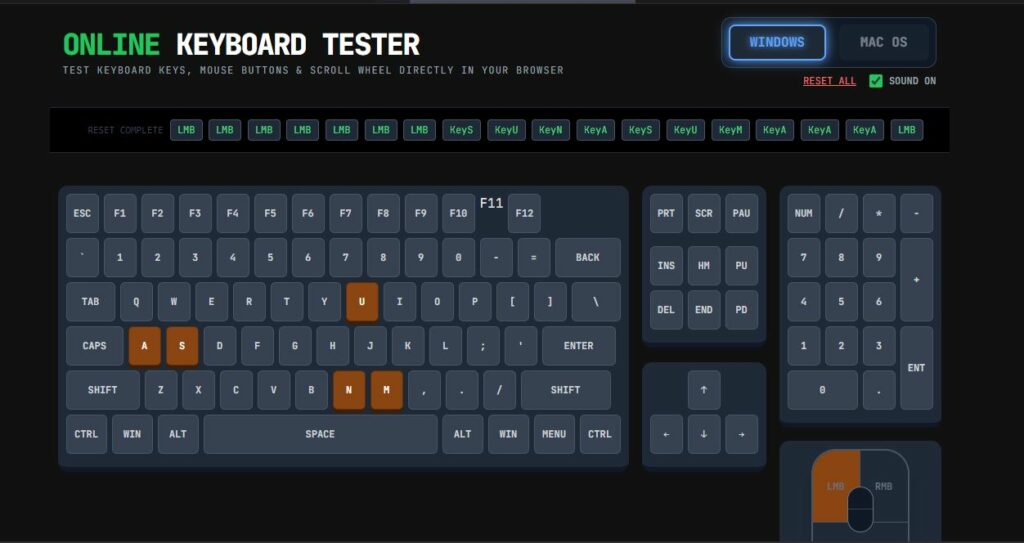
This free online keyboard tester allows you to check every key on your laptop keyboard, mechanical keyboard, gaming keyboard or external USB keyboard directly in your browser. When you press a key, the matching virtual key on the screen lights up in white and then turns brown to show that the key has been successfully tested.
You do not need to download or install any software. Simply open this page and start typing. Every keypress is visualized in real time, so you can find stuck keys, broken switches or ghosting issues very quickly.
How to Use This Online Keyboard Test Tool
- Click anywhere on the page to ensure the tester has focus.
- Press the keys on your physical keyboard one by one.
- Watch the virtual keyboard layout above: working keys will flash white and then brown.
- Use the ticker line at the top to see the latest key codes logged in descending order.
- Test special keys such as Ctrl, Alt, Shift, WIN / CMD, arrows, function keys and the numpad.
- Use the mouse diagram to test left click, right click, middle click and scroll direction.
Why Check Your Keyboard Online?
A keyboard test online is useful when:
- You spilled water or coffee on your keyboard and want to see which keys stopped working.
- Your spacebar, Enter key or arrow keys feel sticky or do not always register.
- You just bought a new mechanical keyboard and want to check for dead switches or manufacturing defects.
- You play games and want to test N-Key Rollover (NKRO) and multiple key combinations.
- You use a wireless keyboard and want to confirm there is no input lag or missed presses.
Windows and Mac Keyboard Layout Support
At the top right, you can switch between Windows and Mac mode. When you choose Windows, the meta keys are labeled as WIN and the modifier keys show ALT. When you select Mac OS, the same keys are labeled as CMD and OPT to match a typical Mac keyboard layout.
This makes the tool useful for users of Windows laptops, MacBook keyboards, external Apple keyboards and generic PC keyboards connected to macOS.
Online Mouse Tester – Buttons and Scroll Wheel
In addition to the keyboard test, this page also acts as an online mouse tester. You can:
- Left-click on your mouse and verify the LMB area lights up.
- Right-click to test the RMB section.
- Press the middle mouse button (scroll wheel click) to test the middle click.
- Scroll up and down to see SCROLL UP and SCROLL DOWN recorded in the ticker.
Tips for Fixing Keyboard Problems
If the online keyboard checker shows that a key does not respond at all, you can try:
- Unplugging and reconnecting your keyboard or USB receiver.
- Restarting your computer to clear any temporary driver issues.
- Cleaning the keyboard with compressed air to remove dust and debris.
- For mechanical keyboards, removing the keycap and checking the switch underneath.
If only certain keys fail repeatedly in this tester, the problem is usually hardware related, not a website or browser issue. In that case, replacing the keyboard may be the best solution.
Frequently Asked Questions About Online Keyboard Testing
1. Is this online keyboard tester safe?
Yes. The tool runs entirely in your browser. It does not store or send your keystrokes to a server. The visualization is purely local, which makes it safe to use for regular testing. However, avoid typing passwords or sensitive information unless necessary.
2. Can I use this on mobile or tablet?
This online keyboard test is mainly designed for physical keyboards connected to a computer. On mobile devices, you can still tap the on-screen keys, but the physical layout is optimized for desktop and laptop screens.
3. Does this tool support gaming keyboards and RGB keyboards?
Yes. Any keyboard recognized by your operating system will work here, including gaming keyboards, RGB mechanical keyboards and wireless Bluetooth keyboards. The online key tester simply reacts to the key codes sent by your system.
4. Can I test multiple keys at the same time?
You can press several keys together to check ghosting behavior and N-Key Rollover. All detected keys will light up on the virtual keyboard. This is helpful for gamers who use complex key combinations in games.
Use this page any time you want to test your keyboard online, check a new keyboard before returning it, or diagnose a suspicious key on your work laptop. Bookmark the tool for quick access whenever a key starts acting strangely.